Language Learning Stack: Obsidian + LUTE
I used to be the "pen-and-paper" guy buried in color-coded highlighters but after watching this guide[1] on LUTE (Learning Using Texts), I’ve decided to adopt this method for my language studies...
but with twist, integrating it into my obsidian vault via 🐍(python)🫰🤤. By bridging these two tools[2], I can now move from reading in LUTE to building a permanent, linked knowledge base in Obsidian for a seamless learning workflow.
If you want to steal my system, you only need two tools:
◈ 𝗢𝗯𝘀𝗶𝗱𝗶𝗮𝗻 (for building our knowledge base)
◈ 𝗟𝗨𝗧𝗘 (Learning Using Texts)
Here is the exact setup I use.
🧠 1. Why LUTE + Obsidian?
- LUTE (Learning Using Texts): It's basically a reading tool where you import texts, transcripts (like those MP4 transcripts we get assigned), or books. As you read, you click on words you don't know, look them up, and mark them as "learning." It tracks your progress over time.
- Obsidian: This is where our actual "second brain" lives.
The problem? LUTE traps your words in its database. We need those words inside Obsidian so we can link them, add grammar notes, and build out our personal dictionaries.
⚙️ 2. The Magical Sync Workflow
To bridge the gap, I wrote a Python script. This script digs into LUTE's database backups, pulls out all the words we are currently learning (or have learned), and automatically generates beautiful Markdown files for Obsidian.
Here is how you use it:
Step A: Export your LUTE Backup
- Open LUTE.
- Go to the settings/backup section.
- Create a manual backup. It will save a
.db.gzbackup file.
Step B: Run the Sync Script
Whenever you finish a reading session and want to bring your new words into Obsidian, just open your terminal and run the sync script:
python3 "/Users/healmiy/archAive/raw/sources/PKMxKB/_Config/Lute/sync_lute_to_obsidian.py"
(Note: If you're copying my vault folder structure, the script is already saved there!)
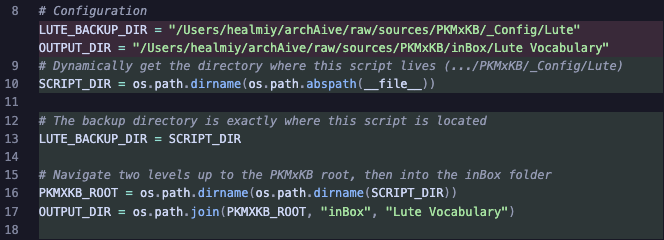
As long as the python script executing the code lives exactly inside the .../PKMxKB/_Config/Lute directory
Step C: Profit 📈
The script will automatically populate your Lute Vocabulary folder in Obsidian. It creates a dedicated .md file for every single word!
📝 3. How the Notes Look
The best part about this script is that it formats everything perfectly for Obsidian using YAML frontmatter. It puts the translation right at the top so database plugins like Dataview can easily read it:
---
translation: "eternal, whole and complete. \"The one whom people direct themselves to in respect of needs to be provided for.\""
word: "ٱلصَّمَدُ"
pronunciation: ""
parent: ""
tags: ["names of Allah"]
---
🔥 Pro-Tip: The script is incredibly smart. If you type your own custom grammar notes, memory hooks, or example sentences in the body of the markdown file, the script will never overwrite them. It only updates the frontmatter properties at the top if you change a translation or tag in LUTE. So feel free to go crazy with your own notes in the body!
TL;DR:
- Read in LUTE.
- Backup LUTE.
- Run the script.
- Flex your flawless Obsidian vocabulary vault.
Let me know if you guys run into any errors setting this up on your laptops!
YT Schen Daniel, 2025. One of the best tools for learning languages through reading ↩︎
parsing the backup file into the frontmatter ↩︎